Senior Internship
Summer Internship
For our senior year at DRSS, we all had to participate in an internship experience either during
STEMmersion or summer break.
For this experience, I chose to do my internship with
the Dayton Regional STEM School TAC (Technology Assistance Center) Department. Each day was 8 hours long, and I did 10 days. You can read more
about what I did on a daily basis below!
Right: The DRSS TAC logo

Mon June 9
• Re-image student Windows laptops
• Fixing issues with re-imaging
• Laptop organization
• Inventory management
Reinstalling the OS
based on a custom version of the OS. It's all automated.
Left:
A picture of the imaging station
Tues June 10
• Re-image laptops
• Inventory
• Post-image checks
• Bug fixes
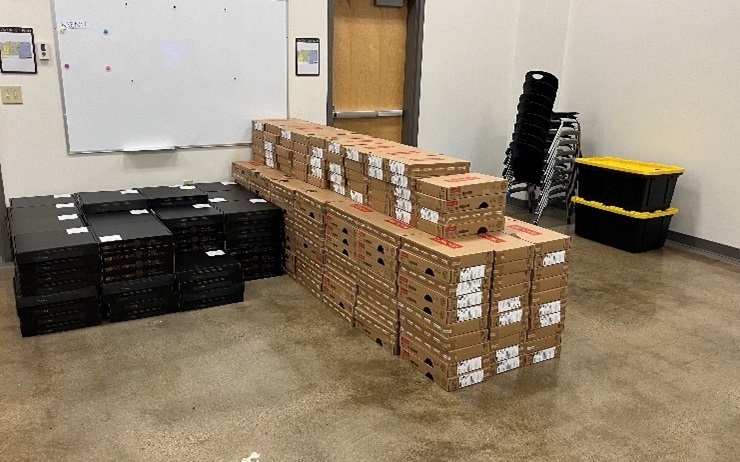
Right: Inventory management

Wed June 11
• Hanging wireless access points in Elementary Swing Space
•
Tour of Elemtary School Swing Space
• Re-imaging laptops
• Fixing
laptop palm rests
The STEM Elementary Swing Space is a temporary
office rental space along Research Blvd that will be used to host the
Elementary students until their building is completed.
Left: Me attaching a Wi-Fi access point to the
ceiling
Thurs June 12
• Re-imaging laptops
• Post-image checks & sticker removal
• Post-image
checks
• Fixing laptop palmrests
The palmrest part of the laptop
is the keyboard and the surrounding plastic frame, excluding the back plate and
lid assembly. Every internal component is attached to this piece, and to replace
it you must remove the backplate and transfer every part over to the new palmrest.
Right: Laptop with the back open


Fri June 13
• Re-imaging laptops
• Post-image checks and sticker removal
•
Fixing laptop palmrests
• Fixing lost WiFi connection with QR code
scanner
• Brunch with TAC team @ Hasty Tasty
There was
an issue with a random selection of laptops where they didn't automatically
receive the student Wi-Fi network information. We fixed this by manually
entering the password with a QR code scanner.
Left:
QR code scanner
Mon June 16
• Re-imaging laptops
• Post-image checks and sticker removal
• Organization
of CTE (computer science) lab: cables, PCs, peripherals, tables
Some of
the stickers were easy to remove, but there is one type of sticker that's very difficult.
There are paper stickers, which are very hard to remove, and there are vinyl stickers,
which tend to be easier.
We ask the students to use vinyl stickers so when we rotate
laptops we have an easier time removing them.
Right: Sticker
removal


Tues June 17
• Re-imaging laptops
• Troubleshoot errors with imaging
•
Laptop inspection and organization
• Repair laptop palmrests
There were occasionally some errors during the imaging
process, and they ranged from software installs to random hardware
failures. We had to make sure everything was working properly and
fix all issues.
Left: An error screen from the
imaging process
Wed June 18
• Re-imaging laptops
• Troubleshoot imaging errors
• Repair
laptop palmrests
• Laptop inspections and organization
•
Begin organization of laptop chargers
Each laptop charger
has two parts, and they all come disassembled. We have to make sure
every part is working, as well as assemble them.
Right: Disassembled laptop chargers


Mon July 14
• Finish re-imaging laptops
• Finish labeling
laptops for the new school year
• Inspect Swing Space TV for
damages during shipping
• Organize laptops alphabetically
• Dispose of used packaging
This TV came in with a hole
in the side of the box, and we had to make sure it wasn't damaged
through the packaging.
Left: Potentially damaged
TV box
Tues July 15
• E-waste and package disposal
• Take down imaging station
• Organize
chargers and Ethernet cables
• Start migration out of DRSS cafeteria
•
Organize chargers
•Start labeling elementary school Chromebooks
Right Top: Laptops on shelves ready to return to students
Right Bottom: E-waste ready to be picked up


Conclusion Paragraph
This internship has been a blast thanks to the DRSS TAC team. I greatly enjoyed
this experience and it really inspired me to work in this field.
We
used a lot of equipment in this internship, mostly including the TAC team's
software and tools. The imaging station (Day 1 picture) was put together by
Mr. Furtaw, and assembled by Mr. Paquette and the rest of TAC. Ms. Wilson
does a lot of the software, and she helped create the Software Center app,
which every computer uses. We also used the inventory system, managed by
Mr. Slone, to keep track of the assets TAC has and uses.
Overall,
this internship has been a very good experience and I can't wait to continue
working for TAC during Experiential Learning in my senior year.